How to Improve Your ATS Score: A 20-Point Checklist (2026)
By Jyoti Sinha, Talent Acquisition Specialist at Leinex Consulting · August 5, 2026 (updated September 19, 2026) · 9 min read
You ran your resume through an ATS checker and got a 62. Now what? Most advice stops at 'add more keywords', which is about as useful as telling someone with a slow website to 'make it faster'. What you need is the actual checklist — specific fixes, organized by category, roughly in order of impact.
That is this article. Twenty points across four tiers: formatting, keywords, content, and files. Work through them in order — formatting comes first because a resume the parser cannot read scores zero on everything else, no matter how strong the content is.
First: What Does an ATS Score Actually Measure?
An ATS score is a simulation. Real applicant tracking systems do not show candidates a number — the score from a tool like our free ATS Resume Checker estimates two things: parseability (can a machine correctly extract your sections, titles, dates, and skills?) and relevance (how closely does your extracted content match a specific job description?). Improving your score means improving both, and the checklist below is split along exactly those lines.
Tier 1: Formatting Fixes (Points 1–6)
1. Convert to a single-column layout
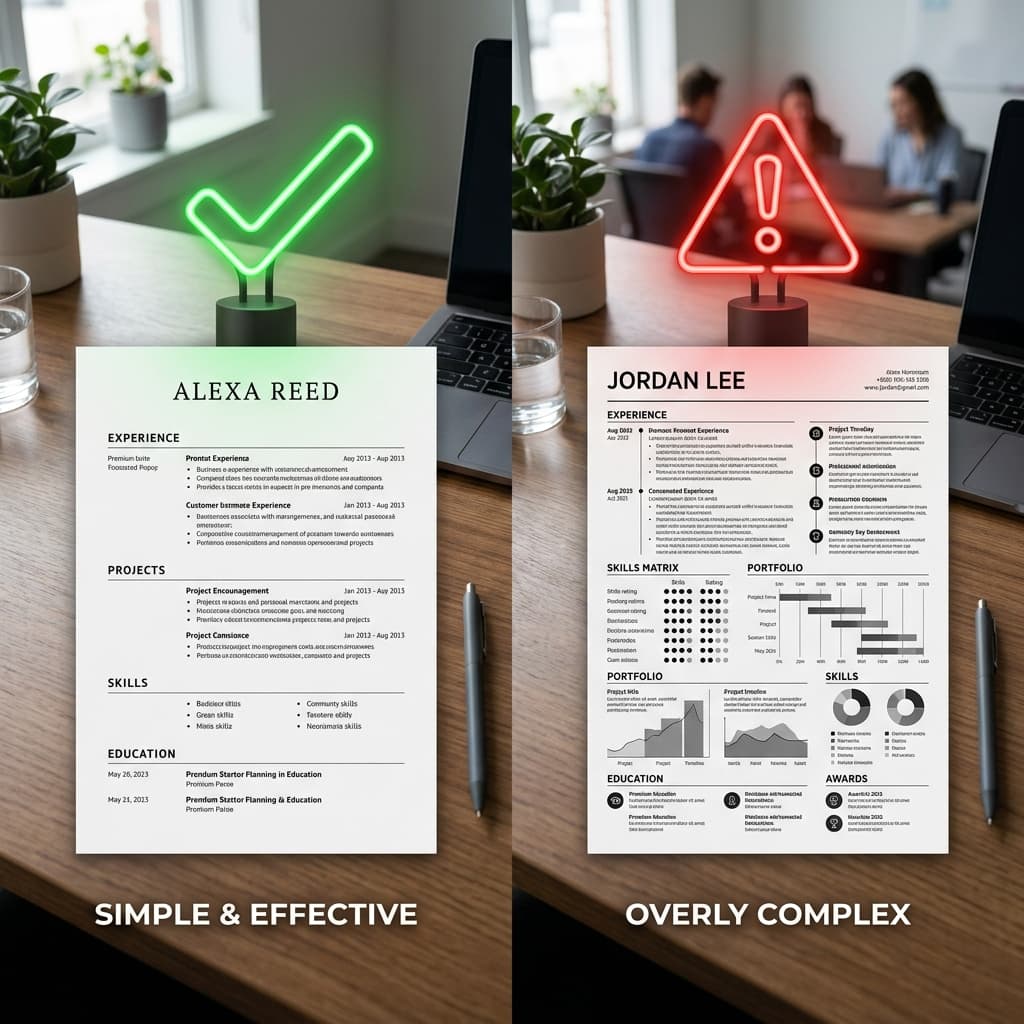
Multi-column layouts are the most common cause of a low parse score. Many parsers read straight across the page, merging your sidebar skills into the middle of your job history and producing gibberish. Move everything into one column, top to bottom. You lose nothing — bold text and spacing create all the visual hierarchy you need.
2. Remove tables, text boxes, and graphics
Content inside a text box is invisible to most parsers, and table cells are frequently read out of order. Skill bars, pie charts, icons, and photos parse as nothing at all — a '4 out of 5' rating graphic conveys zero information to a machine. Replace every visual element with plain text.
3. Move contact details out of the header and footer
Many ATS platforms skip the document header and footer regions entirely. If your phone number and email live there, your application may enter the database with no contact details attached. Put your name, phone, email, LinkedIn URL, and city in the main body, at the very top of the page.
4. Use standard section headings
Parsers locate your content by looking for landmark headings: Work Experience, Education, Skills, Summary, Certifications, Projects. Creative labels like 'My Journey' or 'What I Bring' can cause entire sections to be miscategorized or dropped. Boring headings score better. Every time.
5. Standardize your date formats
Pick one format — 'Jan 2023 – Mar 2025' works everywhere — and use it for every role and every degree. Mixing '1/23' with 'March 2025' confuses date extraction, which is how the system calculates your years of experience. A parsing error here can make a five-year career look like five months.
6. Use a standard font at readable sizes
Arial, Calibri, Helvetica, Georgia, or Times New Roman, at 10–12pt for body text. Decorative and script fonts can cause character-recognition errors, and ultra-thin font weights are sometimes missed by OCR-based systems. This is a two-minute fix with real parsing upside.
Tier 2: Keyword Fixes (Points 7–12)
7. Mirror the exact job title
If the posting says 'Digital Marketing Manager' and your resume headline says 'Growth Marketing Lead', you forfeit one of the highest-weighted matches available. Put the target title — or the closest honest version of it — in your headline and summary. Never invent titles you did not hold, but do add clarifying equivalents where your employer used unusual ones.
8. Pull hard skills straight from the job description
Highlight every tool, skill, certification, and qualification in the posting. For each one that genuinely applies to you, make sure it appears somewhere on your resume — spelled the way the posting spells it. If they say 'JavaScript', do not write 'JS'. Exact matching still drives most keyword scoring in 2026.
9. Cover both the acronym and the full term
Some systems match 'SEO', others match 'Search Engine Optimization', and you cannot know which one is reading you. Write the full term with the acronym once — 'Search Engine Optimization (SEO)' — and you are covered either way. Do the same for degrees: 'Master of Business Administration (MBA)'.
10. Load your summary and skills section with your top matches
The summary and skills sections are where parsers expect to find skills, so keywords placed there are captured most reliably. Your three to five most important keywords for the role belong in your summary; the full honest set belongs in a dedicated skills section as plain, comma- or line-separated text.
11. Weave keywords into your experience bullets
A keyword that appears only in your skills list looks like a claim; the same keyword inside an achievement bullet looks like evidence. Newer scoring models also weight keywords by context and recency — 'built REST APIs in Python serving a million requests a day' beats a bare 'Python' sitting in a list.
12. Cut keywords you cannot defend
Every keyword on your resume is a potential interview question. If a skill would collapse under two minutes of questioning, remove it. A slightly lower score with an honest skill set beats a high score followed by a humiliating technical round — a lesson plenty of candidates in India's crowded IT market learn the hard way.
Tier 3: Content Fixes (Points 13–17)
13. Rewrite your summary for the target role
A generic summary wastes the most valuable parsing real estate on the page. In two or three sentences, state the exact target job title, your years of experience, your two or three most relevant skills, and one quantified achievement. Rewrite it for every distinct role you apply to.
14. Start every bullet with an action verb
'Responsible for managing social media' is passive filler. 'Grew Instagram engagement 45% in six months' is evidence. Action verbs — built, led, reduced, launched, negotiated — make bullets stronger for human readers and give parsers clean sentence structures to extract achievements from.
15. Quantify at least half your bullets
Numbers rarely move the keyword score directly, but they decide what happens after it: the recruiter's six-second skim. Percentages, revenue, team sizes, user counts, time saved. If you cannot share exact figures, honest ranges — 'a team of 8', 'roughly 30% faster' — still do the job.
16. Translate internal jargon into industry language
Your company's internal project names, team labels, and home-grown tool names mean nothing to a parser or an external recruiter. 'Worked on Project Falcon using OrderFlow' scores zero. Reframe it in standard terms: what kind of system it was, which mainstream technologies it involved, and what outcome you delivered.
17. Trim ruthlessly
Length is not directly penalized, but dilution is: a resume covering fifteen years of everything buries the six that matter. Keep the most recent and relevant decade detailed, compress older roles to one-liners, and aim for one page as a fresher, two as an experienced professional.
Tier 4: File Fixes (Points 18–20)
18. Save in the right file format
For online portals, use .docx or a clean text-based PDF; when in doubt, .docx is safest across older systems. Never upload a scanned or image-based PDF — the parser sees a blank page. Quick test: open your PDF and try to select the text with your cursor. If you cannot select it, neither can the ATS.
19. Name the file properly
'Priya-Sharma-Resume.pdf' looks professional in every recruiter inbox and database. 'resume_final_v7 (2).docx' does not. Some systems display filenames prominently to reviewers; a clean name costs nothing and quietly signals attention to detail.
20. Re-check against every job description
Your ATS score is not one fixed number — it is a match between one resume and one posting. A resume scoring 88 for one Data Analyst role can score 61 for another built around a different stack. Check your resume against each specific job description and close the gaps it flags before you apply, not after.
What Counts as a Good ATS Score?
Scales vary between tools, but as a rule of thumb on a 100-point scale:
- Below 50: something structural is wrong — usually broken formatting, or a resume aimed at the wrong kind of role entirely.
- 50–69: parseable but under-matched. Work through the keyword and content tiers above.
- 70–84: competitive. Most interview shortlists are built from this range and up.
- 85+: a strong match. Further gains are marginal — see below.
The Diminishing Returns Beyond 85
Chasing a perfect 100 is a trap (what counts as a good ATS score explains the bands). Past the mid-80s, each additional point tends to come from cramming in marginal keywords, which makes the resume read worse to the human who evaluates it after the machine ranks it. Remember the sequence: the ATS ranks, a person decides. A 90 that reads naturally beats a 98 that reads like keyword salad.
Once you are consistently scoring in the high 80s, your time earns more elsewhere: a tailored cover letter, a referral from someone inside the company, or five more applications to well-matched roles.
ATS Score Myths, Debunked
Myth: hiding white-text keywords boosts your score
This old trick has aged badly. Parsers extract raw text regardless of its colour, so your hidden keyword block appears in plain view when the recruiter opens your parsed profile — and many systems flag suspected stuffing outright. At best it looks incompetent; at worst it gets you blacklisted at that company.
Myth: the ATS auto-rejects most resumes
True auto-rejection is mostly limited to knockout questions — work authorization, mandatory licences, minimum qualifications. What actually happens to weak resumes is ranking: they are not deleted, they simply sit unread on page four of the recruiter's search results. The outcome is the same, but the fix is ranking higher, not 'beating a rejection bot'.
Myth: a high score guarantees an interview
The score gets you seen. The recruiter still judges your content in seconds — career story, achievement quality, red flags. That is why the content tier of this checklist matters just as much as the keyword tier.
Myth: a beautifully designed resume shows extra effort
To an ATS, an ornate two-column template is a liability, and to a recruiter skimming two hundred applications it makes almost no difference. Design effort is invisible; parsing failures are not. Spend the effort on content instead.
Work the Checklist, Then Move On
Twenty points sounds like a lot, but most take under five minutes, and you pay the formatting cost only once. Fix the structure, tailor the keywords per application, keep the content honest and quantified — then verify the result with our free ATS Resume Checker. Once you are reliably in the 80s, stop optimizing and start applying. The score gets you into the room; your experience does the rest.
Check your resume's ATS score — free
Upload your resume + paste any job description. Get your score in 60 seconds.
Analyze My Resume →